Student Logins

RCOE Device and Student Google/Canvas Login

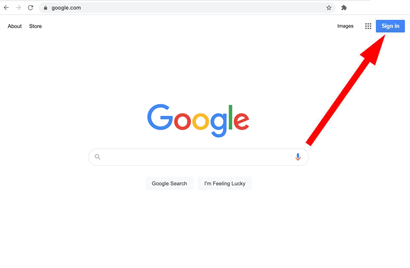
To login to Google, use the “Sign in” button in the upper-right corner.

NOTE: If you do not see the “Sign in” button, you will need to make sure you are signed out of your personal Google account(s).

Login using the following convention:

Username – [ Student ID] @stu.rcoe.us

Password – [ Lowercase first initial] [ Uppercase last initial] [ Date of birth in yyyymmdd format]

EXAMPLE: Student John Smith, student ID number 444444 (From your CBK teacher), date of birth 06/08/2000.

Username = 444444@stu.rcoe.us

Password = jS20000608

This is your own personal log in to any RCOE Device.

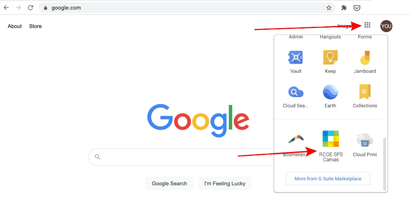
Once signed into your RCOE student Google account, click the waffle menu (3×3 grid, upper-right, near your logged in profile icon). Look for the application icon labeled “RCOE SPS Canvas”. Canvas is your base site for access to all online learning. Once Canvas is launched, click on the class entitled “Homeroom”. You will be guided through your learning portal from there.

2026-2027 Returning Student Registration Instructions

All current CBK students wishing to return to CBK for the 2026-2027 school year, must complete their re-enrollment prior to July 1, 2026 to stay enrolled in CBK. Please see instructions for re-enrollment below:

If you need assistance with registration, please contact Rachel Dryden at 951-826-4563. If the phone lines are busy, please leave your name and contact information, and your call will be answered in the order it was received.

Fall Open Enrollment will begin July 6. The first step is to complete the online CBK orientation. Registration link will not be available until after July 6.


Aeries Parent and Student Portal

Please use the link below to access the Aeries Parent and Student portal.

New users can click on Create New Account. You will need your student ID number, primary telephone number, and your name to verify registration for an account.

Existing users can login with your email and the password you chose at the time of creating the account. If you do not remember your password, please click on Forgot Password.

Aeries Parent and Student Portal

*Please make sure to check your spam/junk when creating an account or resetting your password if you do not receive an email after requesting an account or password.

Edmentum and Plato

Edmentum – Plato

Account Login: RCED2
Username: 6 digit Student ID
Password: mmddyy (6 digit birthday. Just the numbers)

Pearson Learning Solutions

Pearson Digital Learning Tools

Pearson Curriculum Products: ELA, American Gov’t, Economics
Student Log in
Username: 6 digit ID#rcoe-ca
Password: 123

PowerSchool and Haiku

PowerSchool – Haiku

Login: Teacher will provide
Password: Teacher will provide

Sora. Open a world of reading.

Sora – OverDrive

Or DOWNLOAD the app and use setup code: CBKCA

© 2026 CBK Charter School